标题:
[求助]
linux挂载分区成功后,安装一键包时如何让根目录WWW大的分区中
[打印本页]
作者:
lxl12happy
时间:
2015-5-11 00:15
标题:
linux挂载分区成功后,安装一键包时如何让根目录WWW大的分区中
新买的VPS,刚装
linux系统,接着就是分区,分区后准备安装一键包。现在遇到难以下难题。
1:新增分区80G,已挂载成功,网站内容很多,所以我想把WWW放在这个的分区中,可以保证数据的安全和足够的使用空间,没有经验 我不清楚该如何操作?
第一次操作分区,按网上的方法进行的
新增分区和挂载分区的教程方法:
【http://help.aliyun.com/knowledge_detail.htm?spm=5176.7114037.1996646101.11.uZqfJ4&knowledgeId=5974154&pos=6】
已分区,格式化,挂载成功。
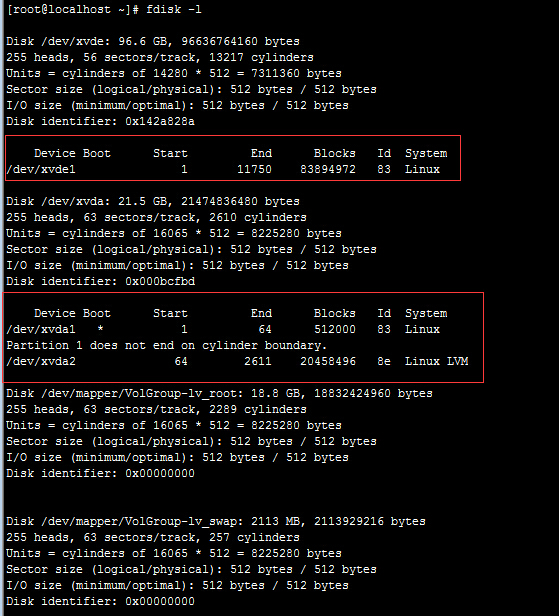
2:分区加载成功后,分区信息如下
[root@localhost ~]# fdisk -l
Disk /dev/xvde: 96.6 GB, 96636764160 bytes
255 heads, 56 sectors/track, 13217 cylinders
Units = cylinders of 14280 * 512 = 7311360 bytes
Sector size (logical/physical): 512 bytes / 512 bytes
I/O size (minimum/optimal): 512 bytes / 512 bytes
Disk identifier: 0x142a828a
Device Boot Start End Blocks Id System
/dev/xvde1 1 11750 83894972 83 Linux
Disk /dev/xvda: 21.5 GB, 21474836480 bytes
255 heads, 63 sectors/track, 2610 cylinders
Units = cylinders of 16065 * 512 = 8225280 bytes
Sector size (logical/physical): 512 bytes / 512 bytes
I/O size (minimum/optimal): 512 bytes / 512 bytes
Disk identifier: 0x000bcfbd
Device Boot Start End Blocks Id System
/dev/xvda1 * 1 64 512000 83 Linux
Partition 1 does not end on cylinder boundary.
/dev/xvda2 64 2611 20458496 8e Linux LVM
Disk /dev/mapper/VolGroup-lv_root: 18.8 GB, 18832424960 bytes
255 heads, 63 sectors/track, 2289 cylinders
Units = cylinders of 16065 * 512 = 8225280 bytes
Sector size (logical/physical): 512 bytes / 512 bytes
I/O size (minimum/optimal): 512 bytes / 512 bytes
Disk identifier: 0x00000000
Disk /dev/mapper/VolGroup-lv_swap: 2113 MB, 2113929216 bytes
255 heads, 63 sectors/track, 257 cylinders
Units = cylinders of 16065 * 512 = 8225280 bytes
Sector size (logical/physical): 512 bytes / 512 bytes
I/O size (minimum/optimal): 512 bytes / 512 bytes
Disk identifier: 0x00000000
复制代码
下载
(521.2 KB)
分区信息
2015-5-10 23:45
3:下一步,要安装一键安装包,存放网站的根目录WWW放到最大的数据盘中,请问我该如何操作?
关键1:是安装一键包【后】操作还是 安装一键包【前】操作?
关键2:操作流程和命令或方法?
请教高手和好心人指导指教下,谢谢。
我常用的一键安装包的 安装方法【http://www.wdlinux.cn/lanmp/install.html】
图片附件: [分区信息]
QQ截图20150510231621.jpg
(2015-5-10 23:45, 521.2 KB) / 下载次数 14318
http://www.wdlinux.cn/bbs/attachment.php?aid=5349&k=f7ddfe6d3c0e737683e2b1bf235f4940&t=1777182267&sid=uUQqLW
作者:
lxl12happy
时间:
2015-5-11 02:00
如何实现 www目录 放到/dev/xvde1 ???
作者:
弟子
时间:
2015-6-9 01:41
回复
2#
lxl12happy
在 根目录输入cd /www
然后直接安装就好了。
作者:
admin
时间:
2015-6-9 10:43
把/dev/xvde1加载到www分区就可以
欢迎光临 WDlinux官方论坛 (http://www.wdlinux.cn/bbs/)
Powered by Discuz! 7.2



 图片附件: [分区信息] QQ截图20150510231621.jpg (2015-5-10 23:45, 521.2 KB) / 下载次数 14318